

























POST to an endpoint you control.
Quick start
-
Create an HTTPS endpoint that accepts
POSTrequests withContent-Type: application/json. Example:https://yourapp.example.com/webhooks/parsley -
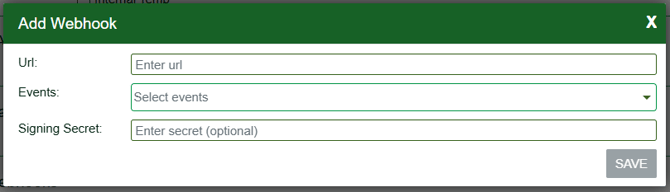
In Parsley → Settings → Webhooks, click Add:
- URL – your endpoint.
- Events – select one or more event types.
- Signing Secret (optional) – An optional signing secret lets you verify that any message delivered to your endpoint was sent by Parsley. We compute x-hub-signature-256 using HMAC-SHA256 so you can validate the request.
- Per-account configuration: You can subscribe the same destination URL to multiple events, but subscriptions are configured per account. If you manage several accounts, set up each one separately.
- Deploy and make sure your endpoint returns HTTP 2xx on success. If your endpoint returns non-2xx, we treat the delivery as a failure on your side.
-
Method:
POST -
Headers:
Content-Type: application/jsonx-hub-signature-256(only if you configured a Signing Secret) –sha256=<lowercase hex>
-
Body (always):
{
  "event": "<EventType>",
  "payload": { ... } // event-specific JSON object
}
A delivery is considered successful if your endpoint responds with 2xx.A non-2xx response is treated as a failure on your side.
If you configure a signing secret, Parsley signs each delivery using HMAC-SHA256 over the entire raw HTTP body (the exact bytes sent). The signature is included as:
- Header:
x-hub-signature-256: sha256=<lowercase hex digest>
What to do on your side
- Read the raw request body (bytes), not a re-serialized object.
- Compute
HMAC_SHA256(secret, raw_body)and hex-encode it (lowercase). - Compare it to the value after
sha256=inx-hub-signature-256using a constant-time comparison. - If it doesn’t match, return 401.
import express from "express";
import crypto from "crypto";

const app = express();

// Preserve the raw bytes of the request body for HMAC verification.
// (Do NOT use express.json() here; parse JSON only after verifying.)
app.use(express.raw({ type: "application/json", limit: "1mb" }));

function verifySignature(req, secret) {
  const header = req.headers["x-hub-signature-256"];
  if (typeof header !== "string" || !header.startsWith("sha256=")) return false;

  const providedHex = header.slice(7).toLowerCase();      // value after "sha256="
  const expected = crypto.createHmac("sha256", secret)
                         .update(req.body)                // raw bytes of entire body
                         .digest();                       // bytes
  const provided = Buffer.from(providedHex, "hex");
  return provided.length === expected.length
      && crypto.timingSafeEqual(provided, expected);      // constant-time compare
}

app.post("/webhooks/parsley", (req, res) => {
  const SECRET = process.env.PARSLEY_SIGNING_SECRET;

  if (SECRET && !verifySignature(req, SECRET)) {
    return res.sendStatus(401);
  }

  // Safe to parse after verification
  const { event, payload } = JSON.parse(req.body.toString("utf8"));

  // ...handle event...
  return res.sendStatus(204); // acknowledge with 2xx
});

app.listen(3000);
Notes
- Always verify before parsing JSON, using the raw bytes.
- Respond with 2xx to acknowledge success. A non-2xx response is treated as a failure on your side.
All events are delivered with this wrapper:
{
  "event": "<EventType>",  // see list below
  "payload": { ... }       // event-specific JSON (signed if signing secret is set)
}
Event types
RecipeCreatedRecipeModifiedRecipeCreatedSyncRecipeModifiedSyncRecipeRemovedSync
Payload schema (applies to all recipe events)
{
  recipeId: number;
  recipeItemNumber?: string | null; // optional
  timestamp: string;                // ISO-8601 UTC
}
Examples
-
RecipeCreated{
"event": "RecipeCreated",
"payload": {
"recipeId": 14257,
"recipeItemNumber": "ITM-REC-0021",
"timestamp": "2025-10-16T18:42:10Z"
}
} -
RecipeModifiedSync{
"event": "RecipeModifiedSync",
"payload": {
"recipeId": 88012,
"recipeItemNumber": null,
"timestamp": "2025-10-16T20:25:33Z"
}
} -
RecipeRemovedSync{
"event": "RecipeRemovedSync",
"payload": {
"recipeId": 88012,
"recipeItemNumber": null,
"timestamp": "2025-10-16T20:30:02Z"
}
}
Event types
EventCreatedEventModifiedEventRemoved
Payload schema (applies to all event webhooks)
{
  eventId: number;
  eventType: "event" | "cafe-hot-bar" | "sale";
  timestamp: string; // ISO-8601 UTC
}
Examples
-
EventCreated{
"event": "EventCreated",
"payload": {
"eventId": 5319,
"eventType": "event",
"timestamp": "2025-10-16T18:44:01Z"
}
} -
EventModified{
"event": "EventModified",
"payload": {
"eventId": 5319,
"eventType": "cafe-hot-bar",
"timestamp": "2025-10-16T19:10:42Z"
}
} -
EventRemoved
Testing
Manual (no signature)
curl -X POST https://yourapp.example.com/webhooks/parsley \
  -H "Content-Type: application/json" \
  -d '{"event":"EventRemoved","payload":{"eventId":5319,"eventType":"sale","timestamp":"2025-10-16T19:45:00Z"}}'
Do you send any extra headers? No. If a signing secret is configured, we only include x-hub-signature-256.
What exactly is signed? Only the raw JSON string of the request body.
What response should my endpoint return? Return 2xx to acknowledge receipt. Non-2xx indicates failure on your side.